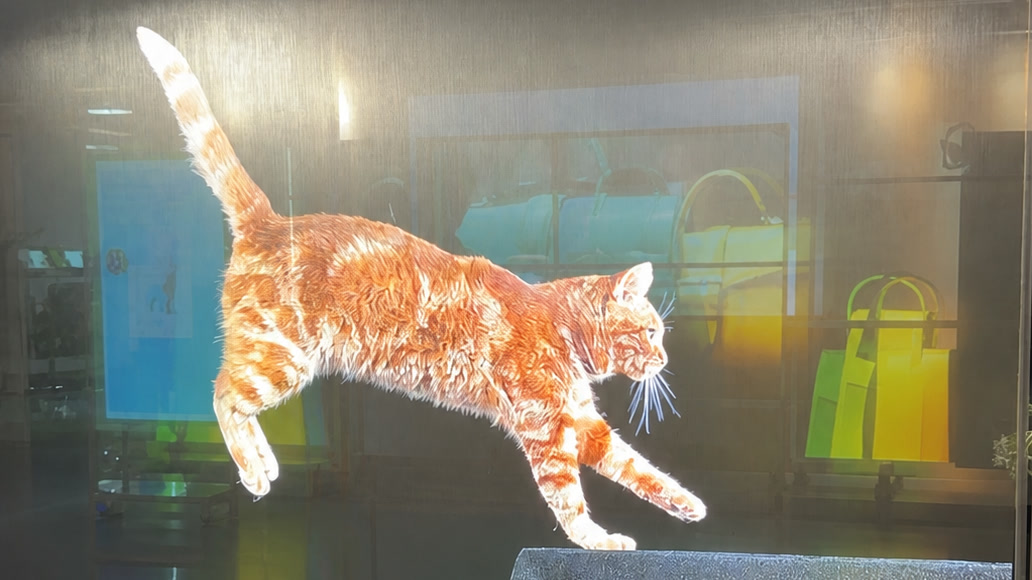
Transparent OLED content in context
A content loop is reviewed with the real object, background, reflections and viewing position.
Creative test set
| Variation | What to compare |
|---|---|
| Background | Real object, dark backing and bright scene |
| Typography | Stroke weight, size, line count and placement |
| Graphics | Sparse overlay, dense composition and motion speed |
| Display state | Active loop, transition and display-off appearance |
Transparent OLED content is not conventional video placed on a clear screen. It is an optical composition made from two simultaneous layers: emitted pixels and the real scene transmitted through the display.
The physical background changes with light, viewer position, reflections and activity. The content must therefore be designed and approved with the intended object, architecture, glazing and operating states — not only on a desktop monitor or an opaque preview.
The strongest transparent OLED content uses the digital layer to direct attention, reveal information or create transformation while preserving a deliberate relationship with the scene behind it.
Survey the real scene before storyboarding
Start with a background survey. Photograph and measure the installation from the nearest, primary and most oblique viewer positions under representative lighting states.
Record:
- background materials, colors and detail density;
- object position and depth behind the display;
- front, rear and object lighting;
- brightest and darkest operating conditions;
- moving people, doors, vehicles or changing exterior views;
- reflections from luminaires, windows and polished surfaces;
- frame, mask, cable and controller visibility;
- display-off appearance;
- critical text zones and prohibited sightline zones.
The survey becomes part of the creative brief. A clean black mock-up is not an accurate preview if the installed background is a bright shop floor or moving exterior view.
Understand what black does — and does not do
On OLED, black and near-black pixels produce little or no emitted image light. More of the transmitted scene can therefore remain visible in those areas. This is why sparse compositions often work well.
Black does not remove the display. The substrate, electrodes, protective glass, optical interfaces, reflections, dust and fingerprints remain physically present. A black image, a powered-off display and an empty opening are three different visual states.
Use black as a low-emission part of the composition, not as a promise of perfect optical invisibility.
Design contrast against a variable background
Text contrast on a transparent display cannot be calculated from foreground and digital background colors alone, because the physical scene contributes to every pixel area.
Use the background survey to define relatively controlled zones for critical information. Then test:
- light content over light, mid-tone and dark scene areas;
- saturated colors over real object colors;
- text over moving backgrounds;
- oblique viewing positions and reflections;
- the brightest ambient condition;
- transitions between transparent and information-dense states.
Increase letter weight and spacing before relying on glow or shadow. Effects that appear helpful on an opaque monitor can create haze and reduce the openness of the installation.
Do not place safety-critical or transactional information where a changing background can make it unreadable. If reliable readability is essential, introduce a controlled backing, local dimming state, opaque graphic plate or a different display technology.
Use open area deliberately
Transparent OLED is most convincing when the physical subject has room to remain visible. Suitable visual elements include:
- short labels and callouts;
- outlines that align with a product or artifact;
- restrained particles and traces;
- isolated diagrams or data points;
- short transformations between open and dense states;
- motion that guides the eye toward the physical subject.
Avoid filling the full canvas continuously with bright video merely because the source file is full-frame. Dense content can reduce the perceived reason for using a transparent display and increases OLED image loading.
Open area is not an arbitrary percentage. The correct density depends on the product, scene, lighting and content purpose and must be tested on the actual display.
Design for APL-dependent luminance
LG publishes 200 cd/m² at APL 100% and 600 cd/m² at APL 25% for the 30EW5TP-A and 55EW5Q-C, measured without glass. ITU-R BT.1439 defines Average Picture Level as a frame-average signal quantity expressed relative to the nominal luminance-component value. It should not be reduced to a simple geometric claim about the percentage of white artwork on screen.
Create an APL stress set rather than approving only the hero scene:
- normal sparse overlay;
- densest expected information screen;
- large bright field or transition;
- maximum simultaneous text and graphics;
- dark scene followed by a bright scene;
- real protective glass and the brightest expected background.
Observe not only peak impact but consistency between scenes, text readability, clipping, color behavior and the installed reflections. Product luminance measured without glass is not the same as system readability after integration.
Respect moving-content-only operation
LG publishes 18/7 operation with moving content only for the commercial 30EW5TP-A and 55EW5Q-C. Treat that as a content-system requirement.
Audit every persistent element:
- logo;
- navigation bar;
- language selector;
- frame or decorative border;
- product outline;
- price or route field;
- idle-state instruction;
- status indicator.
A looping background does not make a permanently fixed overlay a moving element. Define how persistent graphics reposition, alternate, fade, clear or enter a screen-rest state. Define the daily off period and the owner of schedule compliance.
If the application requires permanent static information or continuous 24/7 display, do not conceal the mismatch in the creative specification. Requalify the product or technology.
Design the full state model
Interactive and scheduled installations need more than a main loop.
| State | Define | Verify |
|---|---|---|
| Boot | visible start-up, controller readiness and time to content | power-cycle observation |
| Idle | motion, invitation and static-element treatment | duration and image-retention policy |
| Attract | trigger zone and transition | false triggers and viewer approach |
| Active | information hierarchy and interaction feedback | readability and response time |
| Timeout | warning and return route | abandoned session recovery |
| Offline | cached content or controlled message | network-loss test |
| Signal loss | blank, fallback or diagnostic state | source-disconnection test |
| Closed/off | daily schedule and visual appearance | automatic shutdown/start-up |
If a switchable backing, object light or mechanical element is used, include its delayed, failed and manually overridden states. The content must not assume that the physical scene has changed until the control system confirms it.
Build at the released canvas and safe area
Use the exact native pixel canvas, orientation and approved visible area for the selected commercial product. Provide a template containing:
- native raster;
- active and masked areas;
- frame and mechanical occlusion;
- protected text zones;
- physical-object alignment references;
- touch or sensor zones;
- background survey images from key viewpoints;
- permitted codec, frame rate and playback format;
- loop and scheduling requirements.
Do not use the 77-inch LG SIGNATURE OLED T as a generic approval monitor for the 30- or 55-inch commercial transparent OLED products. OLED T is a consumer television with a different enclosure, control concept and product class. Content and integration must be approved on the intended released product.
Prototype the optics, not just the file
The review setup should include the selected display, representative protective glass, background, lighting, controller, player and viewer positions.
Approve a compact but diagnostic test package:
- type weights and sizes over real background zones;
- brand colors and neutral grays;
- fine lines, outlines and small icons;
- sparse, normal and dense compositions;
- slow and fast motion;
- bright-field and transition stress scenes;
- long-duration idle behavior;
- touch or sensor states;
- display-off and failed-source states.
Record the chosen display settings, lighting state, file versions and observations. Otherwise, later content may be judged against a prototype condition that cannot be reproduced.
Deliver a content-system package
The final handover should include:
- approved master canvas and safe-area template;
- background survey and viewer-position references;
- source files and released exports;
- codec, raster, frame-rate and color requirements;
- content-state diagram;
- schedule and daily off period;
- rules for persistent elements;
- APL and readability stress files;
- trigger, timeout and fallback behavior;
- player/CMS publishing instructions;
- version and approval record;
- owner for future content validation.
This package allows future campaigns to preserve the optical and operating assumptions approved for the installation.
Practical review questions
Before approving transparent OLED content, ask:
- Does the physical scene add clear value to every main content state?
- Is critical information readable against the brightest and busiest background?
- Is black described as low emission rather than physical transparency?
- Have dense and bright compositions been tested for APL-related behavior?
- Are all persistent elements compatible with moving-content-only operation?
- Have boot, idle, offline, signal-loss and display-off states been designed?
- Was approval performed on the intended commercial display and optical stack?
If the answer to any question is no, the content is not yet production-ready.
Primary references
- LG 30EW5TP-A commercial transparent OLED — native product format, transparency, luminance conditions and published use profile.
- LG 55EW5Q-C commercial transparent OLED — native product format, transparency, luminance conditions and published use profile.
- LG 55EW5Q-C specification sheet — model-specific conditions including without-glass luminance and moving-content operation.
- LG — Nobody Does Black Like LG OLED — manufacturer explanation that self-lighting OLED pixels can dim or switch off completely.
- ITU-R BT.1439 — formal definition of Average Picture Level as a frame-average signal quantity.
- LG Transparent OLED applications — manufacturer application context.
Scope note
The creative workflow, state model and test package are VITREVIA guidance. Content density, typography, contrast, motion and scene acceptance must be validated on the selected product in the intended optical and operating environment.
Project checklist
Related product and project pages
Transparent OLED Systems
Review 30-inch, 55-inch and 77-inch products and integration packages.
Review Transparent OLED SystemsDelivery and Support
Review delivery documentation, warranty boundaries and spares planning.
Review Delivery and SupportTransparent Display Applications
Connect the technical guidance to transport, retail and museum project contexts.
Explore the ApplicationRelated Display Guide
Continue with the complementary display-system engineering guide.
Read the Related GuideProject Requirements
Organize geometry, environment, content, operation and service inputs for engineering review.
Build the Project Brief